Application
The WWD Workbench
One window over a package: a model tree, a viewport, a properties table and a validation dock. Author against the registry, validate with the reference implementation, place a mechanism, run it, write the study into the file, reopen it.
Definition
The WWD Workbench is a local application that opens a .wwd package, authors its design against the Core property registry, validates it with the reference validator, simulates a tissue driving a mechanism, writes the study back into the package, and exports the package again. It runs in a browser against a loopback bridge to the reference validator. Its four panes are a model tree, a 3D viewport, a properties table and a validation dock. A property authored from the registry carries the registry causal role, and the workbench refuses to bind a response as a control. Every number the simulation engine produces is written with provenance simulated.
The workbench is one application over one file. Design mode edits the article: the component, its frame and named dimensions, the biology, the property fields, the interfaces and the acceptance criteria. Play mode places that article among mechanism parts, connects ports into nets, runs the engine, and writes the study back into the package.
Validation is not a separate step at the end. The validation dock runs the reference implementation over the package bytes and reports conformance findings in one table and design rules in a second table beside them.
The panes
What each region of the window holds.
| Pane | Where | Contents |
|---|---|---|
| Model tree | left pane, Design mode | The package as a tree: component, frame, dimensions, validity window, regions, biology, fields, interfaces, acceptance criteria, results. Each field row shows its causal role beside its name. |
| Assembly | left pane, Play mode | The mechanism palette, the placed parts with their stated parameters, the nets between ports, and the assembly rule check. |
| Viewport | centre pane | A 3D view. In Design mode it draws an axis-aligned box from the named dimensions and states what it did not draw. In Play mode it draws the assembly and reports the part count, the net count and the sample index. |
| Properties | right pane | A dense table for the selected node. Values are edited as quantity strings with the unit shown. Registry facts, property, quantity kind, canonical unit, value shape, causal role and definition, are displayed rather than offered as a choice. |
| Validation dock | bottom pane | Six tabs: Validation, Study, Acceptance, Causal projection, Manifest, Source. Validation lists conformance findings and design rules in separate tables. |
The title bar carries the open file name, the validator identity and the registry sync stamp, so a package authored against a stale registry is visible rather than inferred.
Authoring against the registry
Where the causal role comes from.
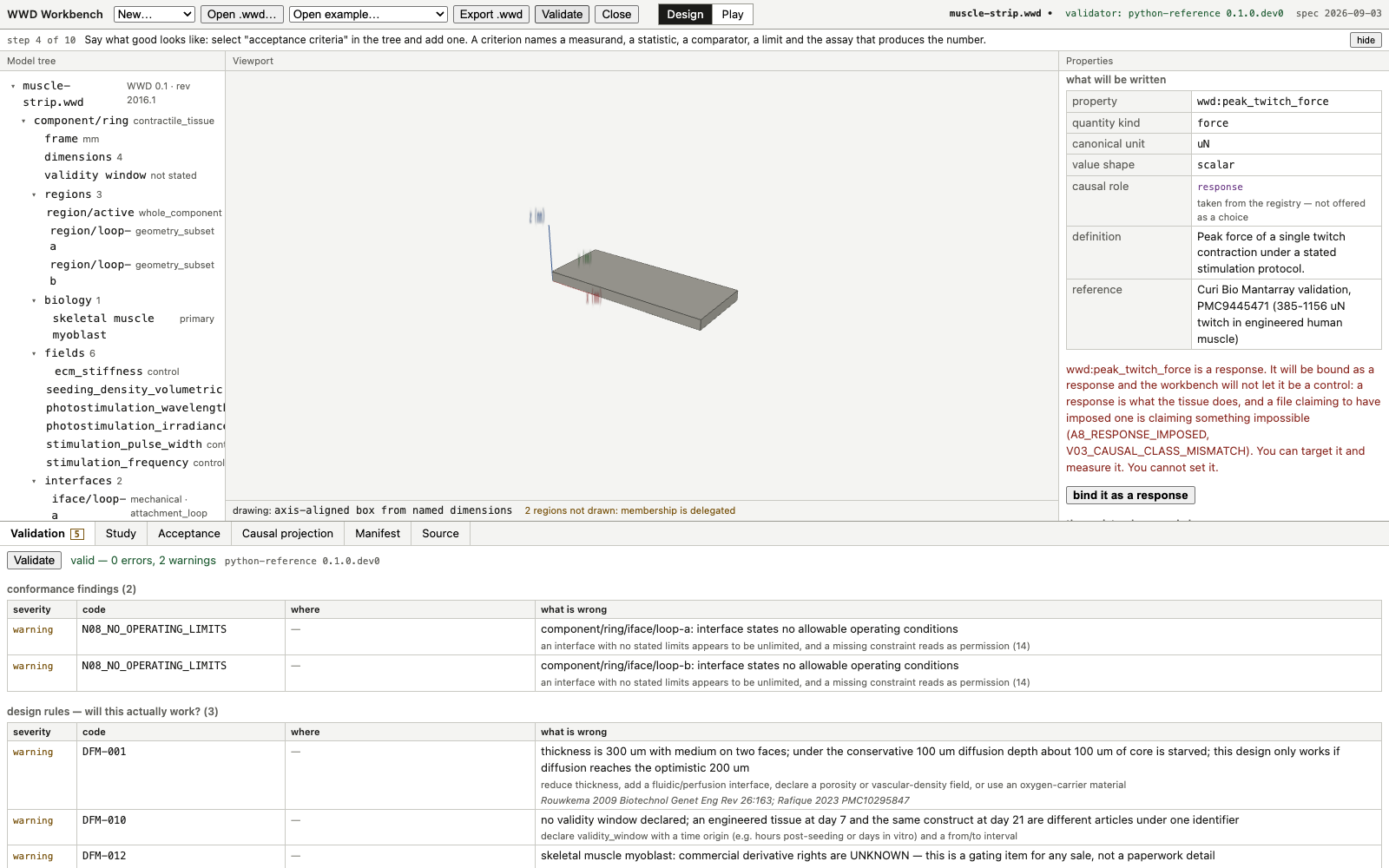
A property added from the Core registry arrives with its quantity kind, its canonical unit, its value shape, its definition and its causal role already fixed. The properties table displays the causal role. It is not a select.
| Row | Where the value comes from | On screen for the twitch-force term |
|---|---|---|
| property | from the registry picker | wwd:peak_twitch_force |
| quantity kind | fixed by the registry term | force |
| canonical unit | fixed by the registry term | uN |
| value shape | fixed by the registry term | scalar |
| causal role | taken from the registry, not offered as a choice | response |
| definition | the registry definition, on screen while authoring | Peak force of a single twitch contraction under a stated stimulation protocol. |
| reference | the registry reference for the term | a published validation range for twitch force in engineered human muscle |
Validation
The same reference implementation, while designing.
The workbench posts the package bytes to a loopback bridge. The bridge hands them to the reference validator and transports the structured report back. It reimplements no rule and decides nothing about severity. It listens on loopback only and refuses a request whose origin is not the local dev server.
The Validation tab carries a status line, valid or invalid with error and warning counts and the validator identity, then two tables. Conformance findings hold the codes from the specification, each with severity, location and message. Design rules hold the design-for-manufacture checks, each with the same columns plus a remedy line and its literature source.
| Tab | Contents |
|---|---|
| Validation | Status line, conformance findings, design rules. |
| Study | Engine identity and binding, the transport, the assembly rule check, and the traces with their provenance stated above them. |
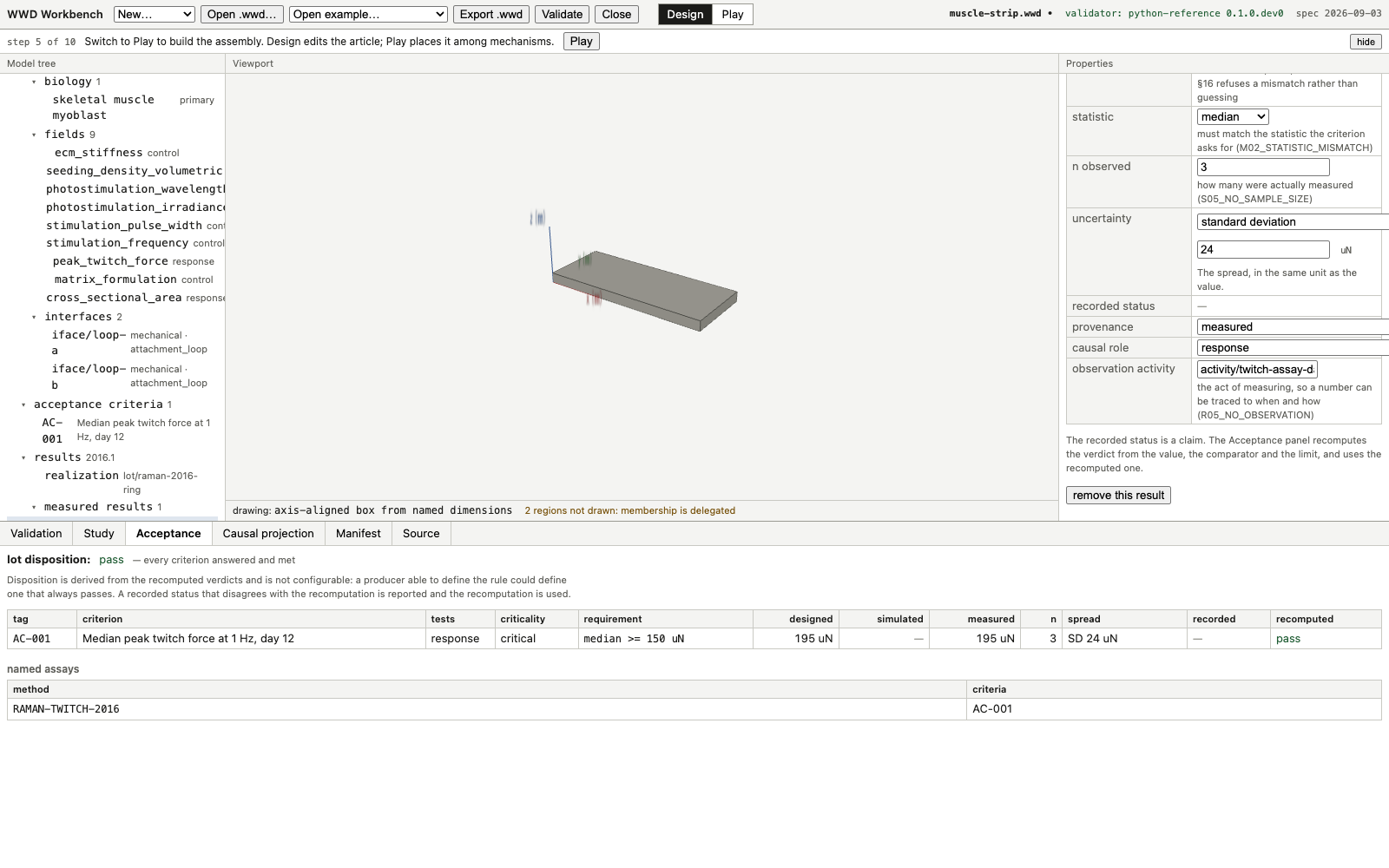
| Acceptance | Lot disposition, one row per criterion with designed, simulated, measured, n, spread, recorded and recomputed columns, and the named assays. |
| Causal projection | The interventional projection of the build. The workbench projection is compared against the reference in the smoke tests. |
| Manifest | The manifest records and their digests. |
| Source | The document as written. |
The assembly has its own rule check in Play mode, reported in errors and warnings beside the conformance findings: ERC09_FLOATING_PART for a part connected to nothing, ERC11_UNRECTIFIED_DRIVE for a drive with no rectification, and ERC13_UNSTATED_PARAMETER, an error, for a physical parameter left unstated.
The mechanism palette
Six part types, their parameters and their ports.
A part is a named type, a set of dimensioned parameters and an ordered feature list that builds the mesh from those parameters. The mesh is derived and is rebuilt when a parameter changes. Every length is a quantity string with an explicit unit. A parameter marked physical decides what the part does rather than what it looks like.
| Part | Type | Parameters | Physical | Ports | Summary |
|---|---|---|---|---|---|
| Anchor post | anchor | width, depth, height | none | face (mechanical), base (ground) | A fixed post. Ground for the rest of the assembly: whatever is bound to it does not move. |
| Lever | lever | length, width, thickness, pivot_fraction | pivot_fraction | in, out (mechanical), pivot (ground) | A rigid beam on a pivot. Trades the short travel of a tissue for a longer stroke, or the reverse. |
| Pinwheel | pinwheel | radius, blades, hub_radius, thickness | radius, blades | rim (mechanical), axle (ground) | A hub with radial blades on a free axle. Spins when something drives its rim in one direction. |
| Flexure | flexure | length, width, thickness, material, beams, folds | thickness, material | a, b (mechanical) | A thin beam that bends instead of hinging. No bearing, no backlash; its stiffness is a design parameter. |
| Spring | spring | stiffness, free_length, width, coils, wire | stiffness | a, b (mechanical) | A compliant return element. A muscle can only pull, so something has to pull it back. |
| One-way clutch | clutch | direction, radius, teeth, thickness, preload | direction | input, output (mechanical), frame (ground) | A ratchet. Passes motion one way and slips the other. |
| Kind | Read as | Example |
|---|---|---|
| length | a quantity string with a length unit | "3 mm" |
| count | a whole number, no unit | 6 |
| fraction | a dimensionless fraction | 0.3 |
| quantity | a quantity string in the unit the parameter is stated in; another unit is refused, not converted | "2 N/m" |
| enum | one of a closed set, rendered as a select | advance_ccw |
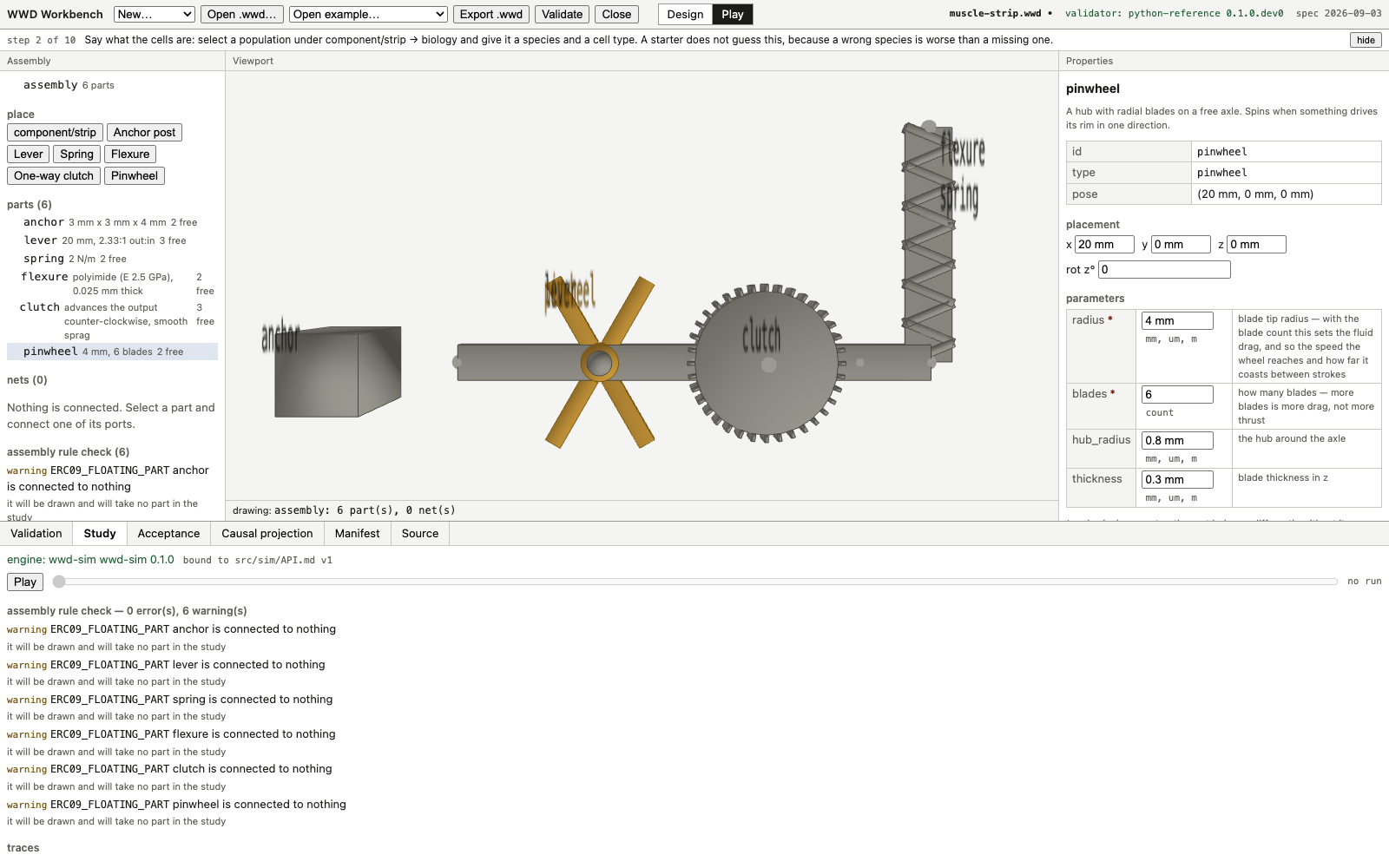
What the engine computes
Channels, and the envelope every parameter wears.
A tissue element is a Hill-type contractile line element between two attachment points. It pulls and never pushes, and passive tension appears only above slack length. Internally the engine is strict SI. Every plottable quantity is a channel with a stable id, a unit, a quantity kind and provenance simulated.
| Channel | Unit | Meaning |
|---|---|---|
| tissue/<id>/force, /active_force, /passive_force | N | Tension along the line of action and its two components. |
| tissue/<id>/length, /strain, /velocity | m, 1, m/s | Kinematics of the contractile line element. |
| tissue/<id>/activation | 1 | Zero to one, after twitch summation. |
| tissue/<id>/capacity | 1 | One is fresh. Falls with fatigue. |
| tissue/<id>/power, /work | W, J | Mechanical output. |
| body/<id>/x, /y, /theta, /omega | m, m, rad, rad/s | Rigid body pose and rate. Always recorded, so the scrub bar can redraw. |
| rotor/<id>/rpm, /drag_torque | 1/min, N*m | Signed rotor speed and the drag opposing it. |
| clutch/<id>/count, /engaged, /direction, /driven_angle | 1, 1, 1, rad | Teeth advanced, engagement, the sign it rectified, and net rotation of the body it carries. |
| spring|flexure/<id>/stiffness, /force | N/m, N | The rate the run used and the tension in the element. |
| diaphragm/<id>/deflection_ratio, /stiffness | 1, N/m | Deflection over thickness, and stiffness derived from the sheet. |
| neural/<id>/firing_rate, /burst_rate, /network_burst_rate, /active_fraction | Hz, 1/min, 1/min, 1 | Spike statistics from a neural unit. |
| solver/residual | 1 | Constraint residual behind the status line. |
Each tissue parameter carries a provenance envelope: value, unit, provenance class, and a source where the class requires one. A parameter interpolated between two published anchors is tagged inferred and names both anchors. A parameter with no anchor is assumed and says so in the study. Nothing is silently defaulted.
A session
The first-run path, as the test drives it.
The first-run test starts with an empty application and ends with a package reopened from disk: 53 interactions and 2073 ms of machine time. The elapsed time is a machine driving the interface, so it times the application and not a person. What transfers to a person is the interaction count and that no step needed documentation.
| Machine time | Interactions | Landmark |
|---|---|---|
| 110 ms | 1 | package created |
| 287 ms | 7 | cells stated |
| 446 ms | 17 | acceptance criterion stated |
| 485 ms | 18 | play mode |
| 519 ms | 19 | strip placed |
| 585 ms | 21 | anchors placed |
| 654 ms | 25 | ends connected |
| 722 ms | 29 | stimulation set |
| 821 ms | 30 | first run |
| 1122 ms | 36 | drive train placed |
| 1409 ms | 50 | drive train connected |
| 1790 ms | 51 | pinwheel turning |
| 1967 ms | 52 | study written |
| 2073 ms | 53 | reopened from the file |
The first-run summary reports, as simulated, a peak twitch force of 148.0 uN and a rotor turned 62.2 degrees at up to 1.38 rpm.
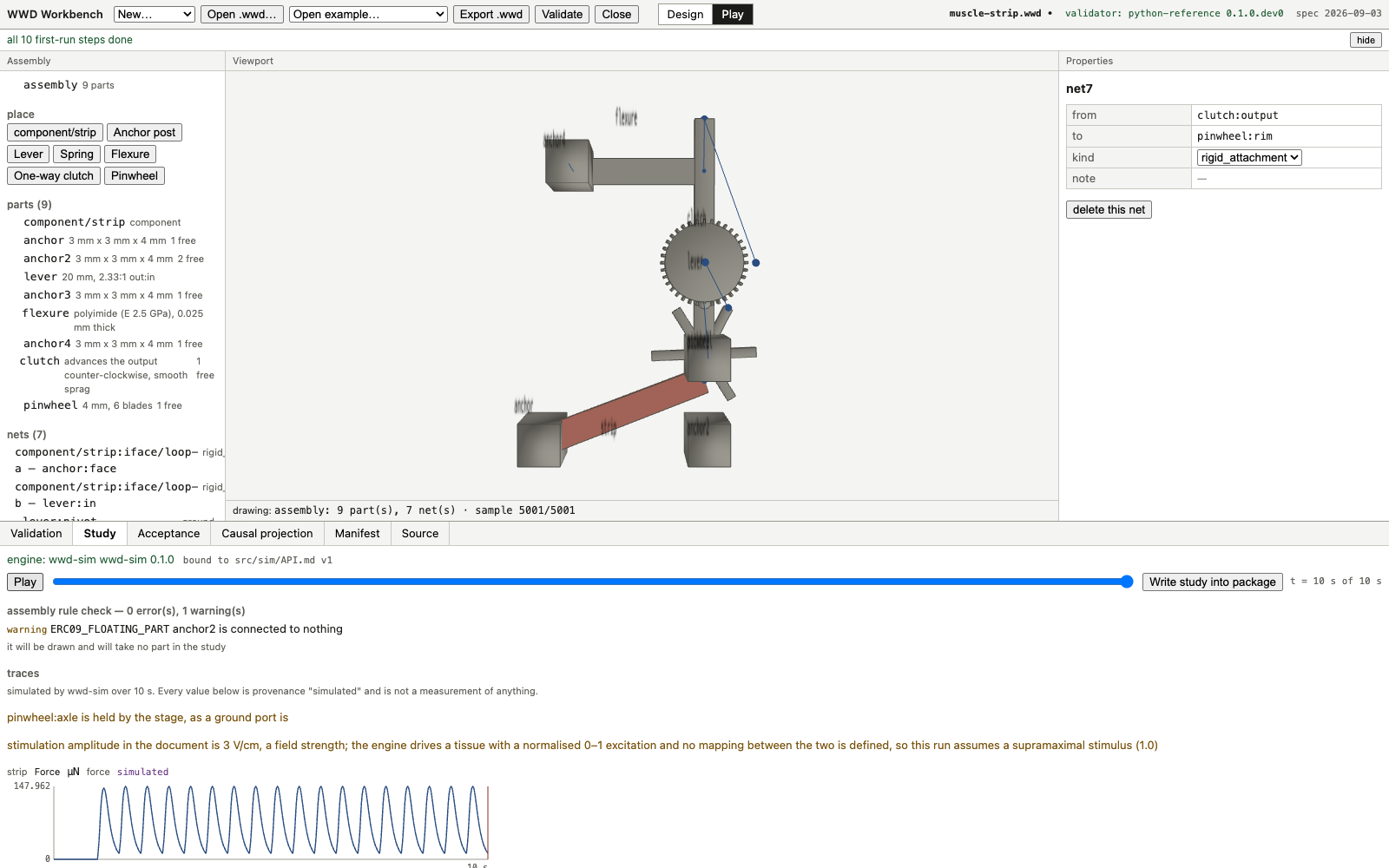
The reference run
Every number below is simulated.
| Quantity | Value |
|---|---|
| simulated | 10 s at 2 Hz stimulation, 5001 samples |
| wall clock | 0.33 s in the browser |
| peak tissue force | 147.3 uN |
| peak active force | 147.3 uN |
| peak activation | 0.205 |
| peak shortening | 1.5 % |
| capacity at end | 1.000 (1 = fresh) |
| work delivered | 0.8 nJ |
| peak rotor speed | 1.36 rpm |
| rotor rotation | 55.2 degrees |
| clutch | smooth sprag, no teeth (a tooth count quantises the stroke) |
| ledger | 25 parameters, 7 designed, 11 inferred, 6 assumed, 1 measured |
These are outputs of a model, not measurements of a tissue. The engine hard-codes provenance simulated on everything it emits, writes no measured results and no yield, and a comparison against a designed requirement returns consistent, inconsistent or inconclusive rather than pass or fail.
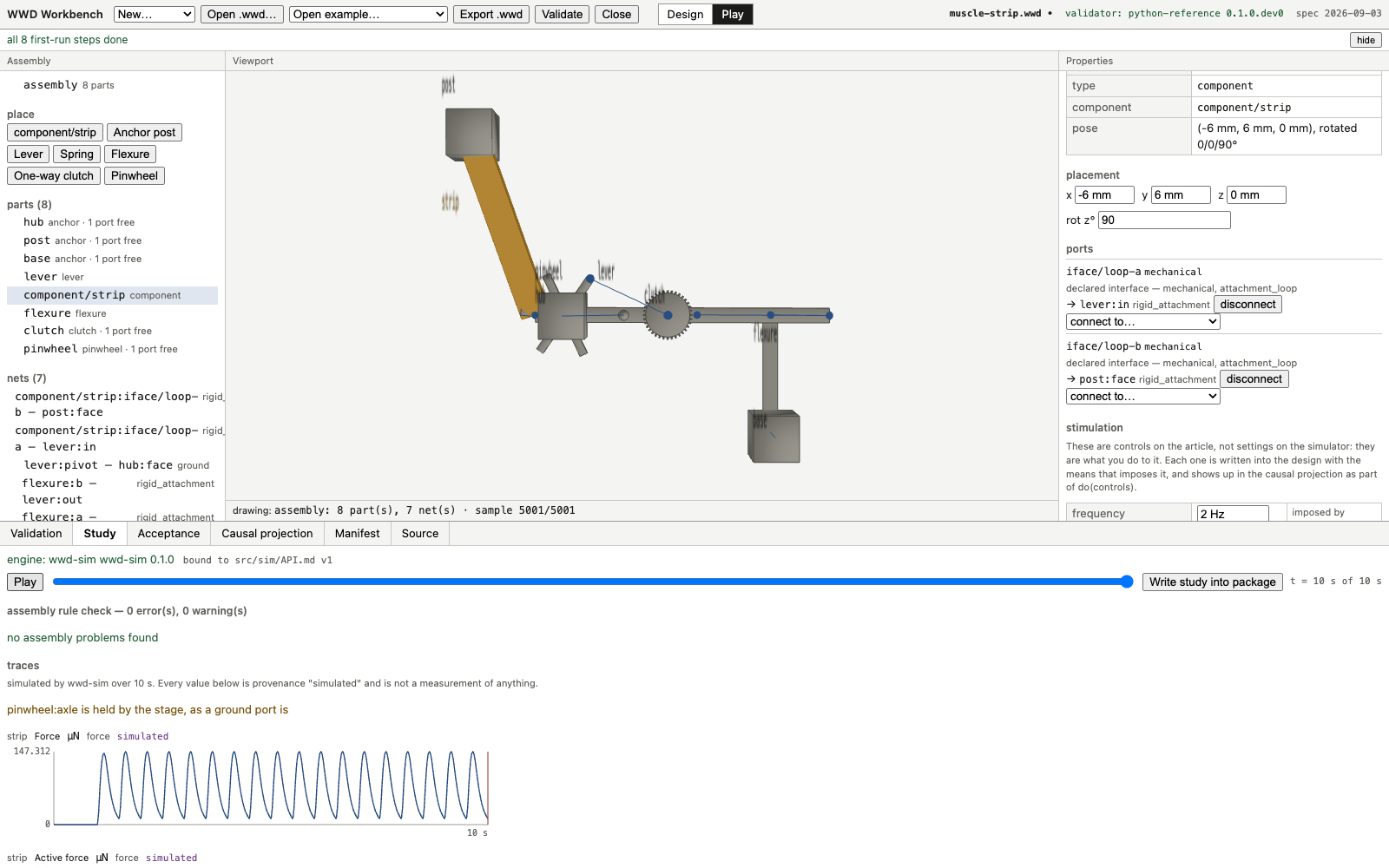
The round trip
A study written into the package and reopened.
Writing the study adds simulation models, runs and results to the package, and carries the traces as a delegated CSV named by the run that produced it, manifested with its digest. Reopening reads the trace back out. The reopened session has no live run: the sample count, the peak force and the final rotation match the live run, and the viewport states the file it is drawing from.
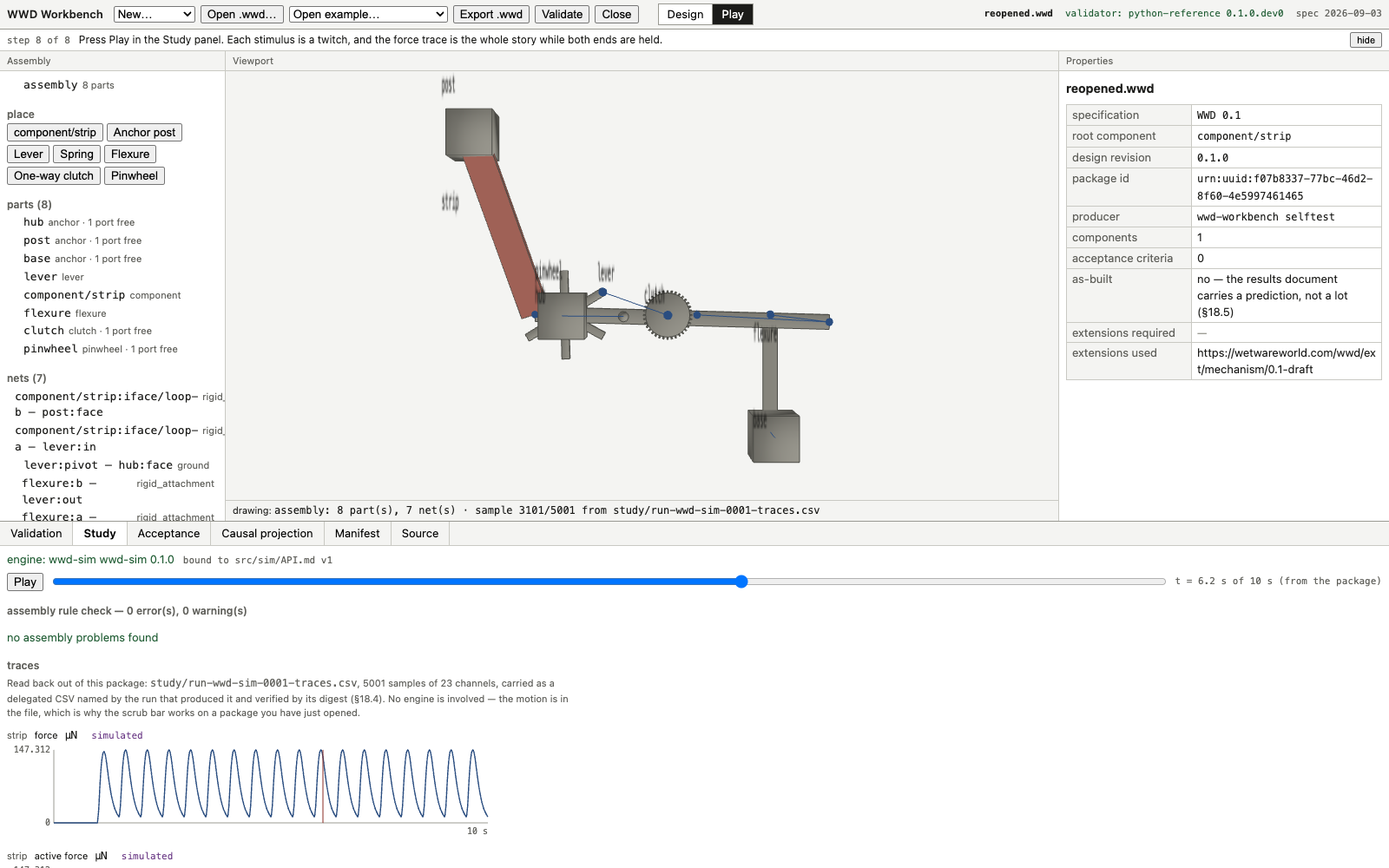
What is proven
The browser suites and what each drives.
| Suite | What it drives and asserts |
|---|---|
| ui-smoke.mjs | Opens each shipped example, reads the validator status, counts model-tree rows, reads the disposition and the acceptance table, compares the workbench causal projection against the reference, verifies every manifest digest, and re-exports each package to check the design and results documents round-trip with no archive entry lost. |
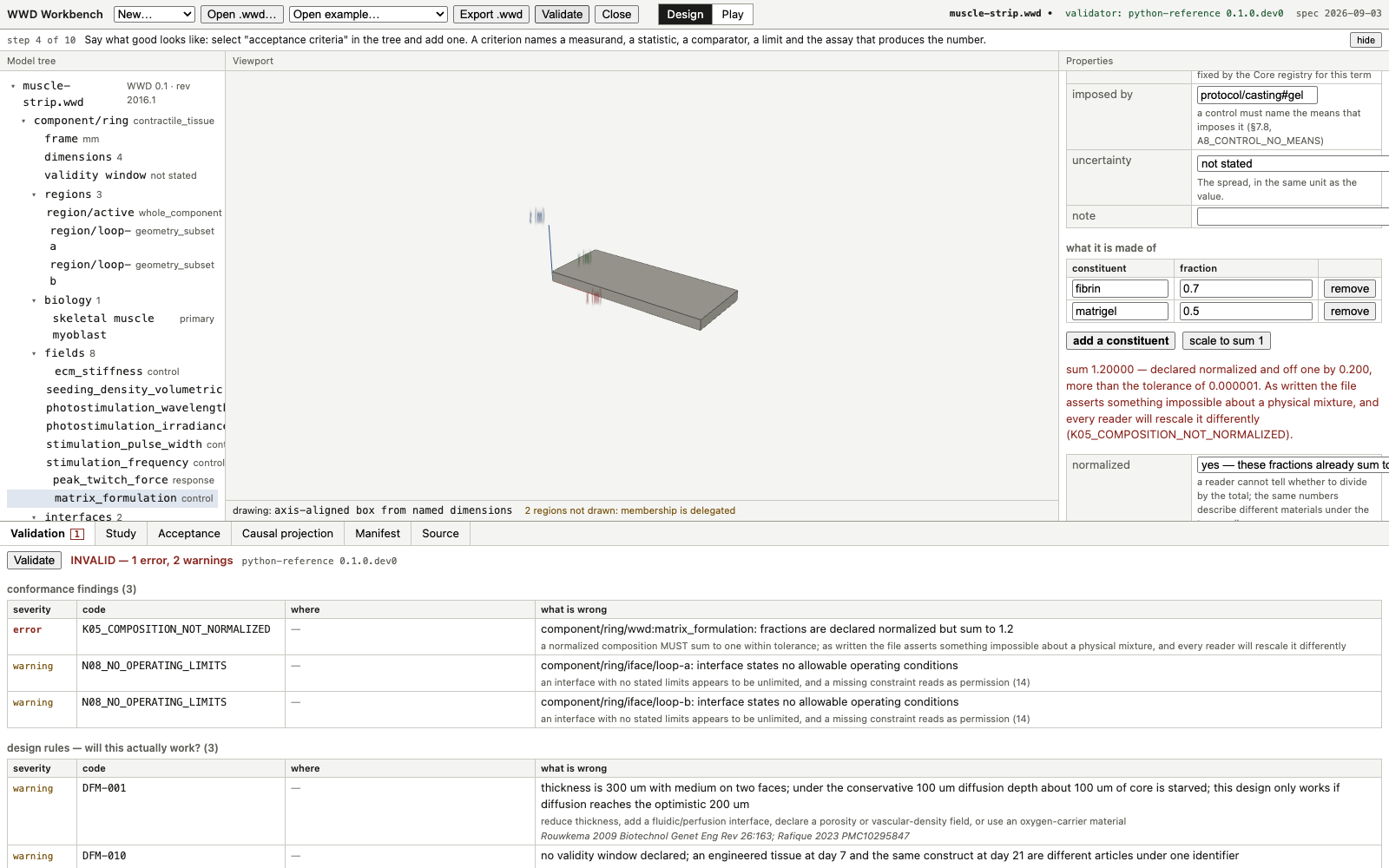
| author-smoke.mjs | Authors a package through the UI alone. Asserts the response refusal and the bind-it-as-a-response button, that a registered term shows no causal-role select, the running composition total, K05_COMPOSITION_NOT_NORMALIZED agreement with the reference validator, uncertainty and sampling entry, and that the finished package has zero errors and reopens unchanged. |
| palette-smoke.mjs | Places one of every part type, checks each parameter is surfaced with an editable field or a select for a closed set, that it states its domain and its unit on screen, that physical parameters are starred, and that clearing one reports ERC13_UNSTATED_PARAMETER. |
| play-smoke.mjs | Builds a six-part assembly with five nets through the UI, checks the assembly rule check, ERC11_UNRECTIFIED_DRIVE on an unrectified drive, that stimulation is written onto the article, that the assembly round-trips, and that the mechanism extension is declared and prefix-bound without being required of a reader. |
| run-smoke.mjs | Compiles the assembly to a scene, runs it, checks convergence, force, activation, shortening, lever rotation and rotor speed, that every simulation provenance value is simulated, that reversing the clutch reverses the rotor, that the study writes one model and one run with a digested trace file, and that the reopened package reproduces the run with no engine. |
| firstrun.mjs | Drives the whole first-run path from an empty application to a reopened package, timing each landmark and counting interactions. |
Each suite drives the real interface in a browser, fails on a console error, and writes the
screenshots on this page as it goes. Both summaries on this page end with the line
all checks passed.
What the application does not do
The boundary of the workbench.
| Not done | Rule |
|---|---|
| Implement validation rules | The application does not reimplement, wrap or interpret any conformance rule. The package bytes are posted to a loopback bridge that hands them to the reference validator and transports the structured report back. The bridge listens on loopback only and refuses a request whose origin is not the local dev server. |
| Own the registry meaning | The workbench reads a one-way synced copy of the Core property registry, stamped with the source path and a SHA-256 per file. The stamp is on screen in the title bar and in the add-a-property panel. |
| Produce measured numbers | Every value leaving the engine is provenance simulated. There is no parameter, option or override that produces another value, and simulation writes no measured results and no yield. |
| Return pass or fail from a simulation | A comparison against a designed requirement is an assessment returning consistent, inconsistent or inconclusive. A criterion that does not permit simulation gets no assessment at all. |
| Report a run that did not converge | Completion and convergence are separate facts. A run that finished without reaching tolerance emits no results. A blow-up stops integration and the run is reported as not complete. |
| Run an engine on a reopened package | The motion of a reopened package is read from the delegated trace CSV named by the run and verified by its digest. The scrub bar works on a package with no live run. |
| Draw delegated region membership | The Design viewport draws an axis-aligned box from the named dimensions and states the regions it did not draw because membership is delegated. |
| Carry cartridge geometry | Every palette shape is a textbook primitive: a rectangular post, a beam with a pivot, a hub with radial blades, a ratchet wheel. |
Nothing here is published software. The application, its packages and its screenshots are local.
Questions
What is the WWD Workbench?
A local application that opens a .wwd package, authors it, validates it, simulates it and exports it again. It has two modes. Design mode edits the article: the model tree, the named dimensions, the biology, the property fields, the interfaces and the acceptance criteria. Play mode places the article among mechanism parts, connects ports into nets, runs the simulation engine, and writes the study into the package. The panes are a model tree or assembly list on the left, a 3D viewport in the centre, a properties table on the right, and a validation dock along the bottom with tabs for Validation, Study, Acceptance, Causal projection, Manifest and Source.
What happens when a response is bound as a control?
The workbench refuses. A property added from the Core registry carries the registry causal role, and the properties panel displays that role rather than offering it as a select. Selecting a registered response states the consequence before anything is written, names the diagnostics a file claiming an imposed response would earn, A8_RESPONSE_IMPOSED and V03_CAUSAL_CLASS_MISMATCH, and offers a single button that binds it as a response. The author smoke test asserts all three behaviours: the stated consequence, the button naming what it will bind, and the absence of a causal-role select on a registered term.
Which validator runs while designing?
The reference validator. The workbench posts the package bytes to a loopback bridge which calls the reference implementation and returns the structured report. The bridge reimplements no rule and decides nothing. The validation dock reports the status line, valid or invalid with error and warning counts, and the validator identity. Findings arrive in two tables: conformance findings, with severity, code, location and message, and design rules, the design-for-manufacture checks, in a second table under the same tab.
What does the simulation engine compute?
A tissue element is a Hill-type contractile line element between two attachment points. It pulls and never pushes, and passive tension appears only above slack length. The engine integrates that tissue against rigid bodies, joints, flexures, springs, one-way clutches, rotors and diaphragms, and exposes every plottable quantity as a channel with a stable id, a unit, a quantity kind and provenance simulated. Channels cover force and its active and passive components, length, strain, velocity, activation, capacity, power, work, body pose and rate, rotor rpm and drag torque, clutch count, engagement, direction and driven angle, spring and flexure stiffness and force, diaphragm deflection ratio and stiffness, neural firing, burst and network burst rates, and the constraint residual.
Where do the tissue parameters come from?
Each parameter wears a provenance envelope carrying its value, unit, provenance class and, where the class requires it, a source. Published anchor points sit in the engine data file with their citation, the quantity each fixes and the conditions they were taken under. A design between two anchors gets an interpolated parameter tagged inferred, naming both anchors and the position between them. A parameter with no anchor is assumed and says so in the study. The run summary reports the ledger for the reference run as 25 parameters, 7 designed, 11 inferred, 6 assumed and 1 measured.
What does a session look like?
The first-run test drives the application from an empty state to a reopened package in 53 interactions and 2073 ms of machine time. Landmarks: package created at 1 interaction, cells stated at 7, acceptance criterion stated at 17, play mode at 18, strip placed at 19, anchors placed at 21, ends connected at 25, stimulation set at 29, first run at 30, drive train placed at 36, drive train connected at 50, pinwheel turning at 51, study written at 52, reopened from the file at 53. The elapsed time is a machine driving the UI and times the application rather than a person. What transfers is the interaction count and that no step needed documentation.
What are the simulated numbers for the reference run?
The run summary reports, all as simulated and none as measured: 10 s at 2 Hz stimulation, 5001 samples, wall clock 0.33 s in the browser, peak tissue force 147.3 uN, peak active force 147.3 uN, peak activation 0.205, peak shortening 1.5 percent, capacity at end 1.000 where 1 is fresh, work delivered 0.8 nJ, peak rotor speed 1.36 rpm and rotor rotation 55.2 degrees, with a smooth sprag clutch and no teeth. The first-run summary for its own longer path reports peak twitch force 148.0 uN and a rotor turned 62.2 degrees at up to 1.38 rpm. Every value is provenance simulated and is not a measurement of anything.
What is in the mechanism palette?
Six part types: anchor post, lever, pinwheel, flexure, spring and one-way clutch. Each is a named type with dimensioned parameters and an ordered feature list that builds the mesh, so the mesh is derived and is rebuilt when a parameter changes. Every length is a quantity string with an explicit unit and counts are plain integers. Seven parameters across the six types are marked physical, meaning the part does not describe a physical thing without them: the lever pivot fraction, the pinwheel radius and blade count, the flexure thickness and material, the spring stiffness and the clutch direction. An unstated physical parameter is reported as ERC13_UNSTATED_PARAMETER, an error rather than a quiet default.
How does the round trip work?
A finished run is written into the package as simulation models, runs and results, with the traces carried as a delegated CSV named by the run and recorded in the manifest with its digest. Reopening the package reads the trace back: the reopened session has no live run, the sample count and the recorded rotation match the live run, the channel list comes back with units, and the viewport states that it is drawing from the trace file. The properties panel reports as-built as no, because a results document carrying a prediction is not a lot.
What does the application not do?
It does not implement a conformance rule, does not carry its own copy of the registry meaning, does not produce a value marked measured, does not return pass or fail from a simulation, does not report results from a run that did not converge, does not run an engine on a reopened package, does not draw region membership that is delegated, and carries no cartridge geometry in any part, default or screenshot.
Continue
Related pages.
- The WWD file format. Container, manifest, design and results documents.
- Causal roles. control, response, context and derived.
- The reference validator. Every diagnostic code and how to run it.
- Design rules. The design-for-manufacture checks and their thresholds.
- Acceptance criteria. Named assays, statistics, recomputed verdicts and yield.
- Interfaces. Ports, anchoring, ground ports and the netlist.
- Geometry and payloads. Named dimensions, delegation and the manifest record.
- As-built. Designed, simulated and measured in one package.
- The WWD 0.1 draft specification. All normative sections with anchors.